

WooCommerce quote payments allow customers to settle approved quotes through any active payment gateway when your store uses Auto Quote Mode. With WooCommerce Quotes and Orders, an approved quote becomes a real WooCommerce order. As a result, the customer can settle it instantly using any active gateway, such as Stripe or PayPal. Below, we explain exactly how this works.
How WooCommerce quote payments work
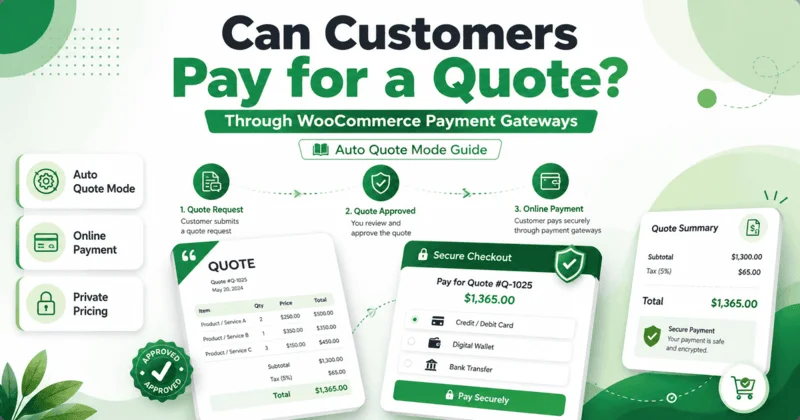
The flow is simple, because it reuses the standard WooCommerce checkout. A visitor adds items to the quote cart and proceeds through checkout to request a quote. In Auto Quote Mode, the system then sends a quote request email straight away. That email is the WooCommerce Order Received email, and it shows itemized prices, shipping and taxes.
From there, the customer simply opens their My Account dashboard. They click the Pay button on the quote and complete the transaction. Meanwhile, the payment runs through the gateways already active on your site. For example, if you have Stripe and PayPal enabled, both appear at that payment step.
Auto Quote Mode versus Manual Quote Mode
WooCommerce Quotes and Orders gives you two quoting routes. The difference matters, because only one of them lets customers pay online without staff involvement.
- Auto Quote Mode — the user receives a system-generated quote with prices, then can pay for a quote through WooCommerce payment gateways immediately.
- Manual Quote Mode — you price the quote offline, then add pricing and use a WooCommerce Order Action to send it. The customer pays once they approve.
In both modes, prices stay hidden across your shop, product pages, cart and checkout. Therefore the customer never sees website prices, only the prices on their actual quote. This keeps your pricing private while still allowing fast payment.
Which gateways support quote payments?
Any gateway active on your site is available, because the plugin works through the native WooCommerce payment system. As a result, there is no special gateway list to manage. WooCommerce already supports well over a hundred gateways, so you simply enable the ones you want. You can learn more about how these gateways function in this Everything You Need to Know About WooCommerce Payment Gateways – Sellbrite overview.
This is the key benefit of letting customers pay for a quote through WooCommerce payment gateways: you reuse your existing checkout. For example, the same Stripe or PayPal account that handles regular orders also handles paid quotes. Meanwhile, no extra merchant setup is required.
What if you do not want online payment?
Sometimes you do not want any payment at the quote stage. WooCommerce Quotes and Orders covers that too, because each mode has a dedicated payment behavior. The Quotes payment gateway hides all payment options, so visitors can request a quote with no checkout pressure.
There is also Add to Order Mode for business-to-business sales. It turns WooCommerce into an online ordering machine while billing happens offline in your regular cycle. However, when you want instant settlement, Auto Quote Mode remains the route that lets customers pay a quote through your active gateways.
Set up WooCommerce quote payments
Setup is straightforward, because the plugin auto-creates its own admin menu when activated. You open the Settings tab, then choose the Auto Quote store rule. After that, every approved quote becomes a payable WooCommerce order with prices shown only on the quote.
The plugin also auto-creates an account for first-time users when they request a quote. As a result, they can return to My Account, view their quote, and pay. To enable this end-to-end flow, explore WooCommerce Quotes and Orders and switch your store into Auto Quote Mode.