
WP Email Template

We are so confident you'll love this plugin and our same day priority support that ALL a3rev Pro Licenses come with or industry leading 60 day, 100% satisfaction or a 100% money back guarantee. Steve Truman

Founder and team leader @ a3rev

Buy this Plugin

Support

Need help? View this plugins documentation, or post a question on the plugins support forum.

Plugin Details

Last Updated :
2013/04/16
Version History : Category :

WP Email Template does just 2 things – beautifully

1. Applies a responsive, customizable, optimized HTML email template to every email sent from your WordPress site including plugin generated emails.

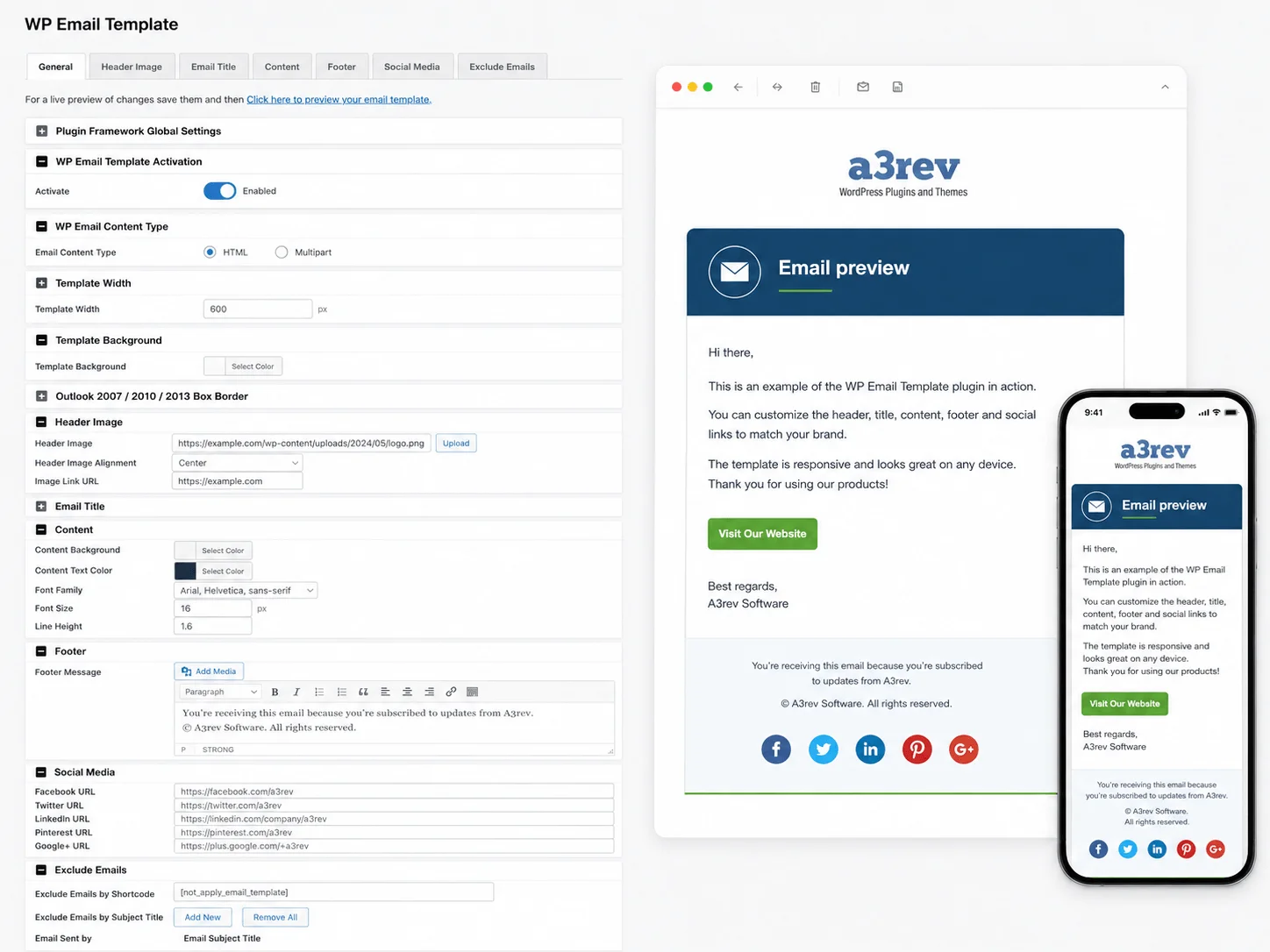
2. Easy to use visual editor allows you to customize the style and header, footer content of your WP Email Template to match your site.
Your Brand

It does not matter if you are running a start-up 1 person blog or an e-commerce site with 1,000′s of products you are trying to build a brand – your brand. WP Email Template ensures that when people interact with you via a comment on a blog post, an email inquiry, a purchase transaction, in fact any email communication between your site and them carries your branding.

Advanced Style Settings

The WP Template allows you to fine tune the style and content of your emails. See the plugins docs for a full description of the options. In addition the WP Email Template has these features:

Social media Icons

The template allows you to add links to your account on these social media channels with linked icons from the emails footer.

* Facebook

* Twitter

* Linkedin

* Pinterest

* Google+1

See plugins docs for full description of this feature.

Marketing and Promotion

The WordPress visual editor in the Footer editor allows you to get very creative in designing your email footer. It turns your emails into a powerful marketing / promotion tool. Every email that goes out from your site should also include marketing and promotional offers. For example if you purchase a plugin right now the email receipt you get will have a footer with a promotional message like this.

Add a marketing / promotional message to the footer of every email generated by your site.


Here is an example of a Beautiful template from a clients site in the USA -

WP Email Template example

Maya the Puppy Poet email template is a great example of classy branding WP Email Template provides


Why we built it.

We built this plugin because we believe it is important that every contact we have with our clients carries our brand. We just did not like those boring unbranded plain text emails WordPress generates and the unbranded HTML styling some plugins apply to our contact with our customers. So we built the WP Email Template to make sure that every contact our online customers have with us carries our brand.

We have used it for a while now and just love it. Our inspiration for the WP Email Template came from the inspired work by the Mike,  James and Coen at WooCommerce.

Plugins

WP Email Template works with every plugin we have tested it on. Click on the gallery to see larger images of each of the examples below of plugins we use and how they look with the template.

* Gravity Forms – looks sensational with the default Gravity style.
* Contact Form 7 – see the screenshots
* WP e-Commerce – applies the template to every store generated email to customers and admins.

Read more about the WP e-Commerce Email Template here.
* WooCommerce – if you have WooCommerce installed WP Email Template will replace the WooCommerce Email Template. You can change this in the plugins setting, see how to do this on the plugins docs – Working with WooCommerce

Read more about the WooComerce Global Email Template here.
* WP Mail SMPT – WordPress Email Template does not interfere with the way any WordPress or any plugin handles email output – it just applies the template to any output content.
* BackupBuddy – I love it when even my admin emails are branded – see the screenshots

Please let us know if you find a plugin that WP Email Template does not apply your template to that plugins email output.

Documentation

WP Email Template requires no set up or configuration. As soon as you install and activate the plugin, it applies the default template to all of your emails. If you wish to add your own custom style then visit the plugins admin page and use the simple visual editor. For the absolute WordPress beginner we do have full pictorial documentation on how to find and use the visual editor features. See the plugins documents on line at the a3rev wiki by clicking the Documentation button at the bottom.

Localization.

If you do a translation for your site please send it to us and we’ll include it in the plugins language folder and credit you here with the translation and a link to your site. The Contact us form has a special section for submitting the .po and .mo files that you will find in the language file in the plugin.

* English (default) – always included.
* Russian – (wp_email_template-ru_RU.po) Thanks to Viktor Demidov
*.po file (wp_email_template.po) in languages folder for translations.

Reviews

There are (4) a3rev user reviews
Joe Jenkins
Finally! One that works...
March 20, 2013 - Really Liked It
Well, I spent the day trying to find a plugin that would make my WordPress emails look good and I've spent hours on it.

I did find one, and I paid for it then installed it and it looked great - until I received an email from WooCommerce and then it didn't look so great, with big gaps and strange WooCommerce headers appearing in strange places.

Then, as 9pm approached, I found the free version version of WP Email Template and tested it with WooCommerce - ooooo, no gaps or strange headers. Was it love at first sight? Maybe closer to lust as I really wanted this plugin, I had to get the pro version, but how much would it cost me?

$10? Is that it? That's only about £7, so I snapped it up, and I'm not sorry that I did (though I got the 10 site license as that makes more sense).

I'm happy, dizzy with happiness as my quest ended with everybody living happily ever after, in a land where dreams can come true.

See screenshot below of how I styled our WordPress Email's using WP Email Template
Paul Burton
Effective, Simple, Professional
January 20, 2013 - Really Liked It
It's one of those less is more kind of plugins. Definitely a "must have" if you want an easy way to make your WordPress site emails look just like the big boys emails...maybe even better.

I'm upgrading to the unlimited licence immediately!
Rich Okun
The very Best of the Best
October 14, 2012 - Really Liked It
While not a novice, I am new to many of the intricacies of making my WP blog a professional, pleasing, and custom platform to launch my creative and commercial efforts. This is the culmination of a lifelong dream that is exciting and scary. The plugins that I used from A3 Rev has helped immeasurably to my effort.

The assistance and guidance that I received from the company was well above any that I have received from any other provider and I recently upgraded to the premium plugin to access even more of this wonderful program. Everything works flawlessly and the support that I received was not only professional and thorough but was extremely personal and special.

I have spent much of my 40 years in various executive levels of companies and have dealt with many different vendors in many different IT functions and needs - This company is the Best of the Best - It gets my very highest recommendation - I will come back over and over. Thank you.

PS - See image below of all emails sent from our site styled with our WP Email Template plugin.
Robert Young
A must have for every website. A++
September 13, 2012 - Really Liked It
The email template plugin for wordpress and woocommerce is a must have plugin, very simple to use and make your site far more professional, easy to implement and easy to under stand with excellent styling option.

I will be using this plugin with every site i build from no on.

A truly exceptional plugin.


Keep up the good work and looking forward to more form A3 Revolution.
There are (0) Reviews from around the web

Leave a Reply

21,435 Spam Comments Blocked so far by Spam Free Wordpress

These Forums are closed! Please visit the all new a3rev support forums.

These forums will be still visible here until the end of June 2013. If you have posted anything here you think should be on the new forum please create a new topic in the appropriate section and copy and paste it there.

Help

  1. Robert says:

    Hello,
    Forgive my ignorance, but I am having trouble customizing the look of the template. Each time I make changes to fonts, colors etc and save the changes, it is reverts to the default settings?

    What am I missing?

    Thanks
    Robert.

  2. Albert Aizman says:

    HI Steve,

    While the color difference is important, the spacing issue in yahoo is most important to me. Is there any way to fix this?

    • Steve Truman says:

      Hello Albert,

      No – because it is not a feature that is supported by Yahoo Mail. Have been scouring the web for a solution – will try some stuff later today and if we can get something to work will put it out as a new version update.

      The issue is using something other than the p tag that gives space at the bottom of paragraphs but does not cause the email to ‘break’ in other email browsers.

  3. Albert Aizman says:

    Having a bit of trouble with screener. Do you have an email adress I can send a screenshot too?

    • Steve Truman says:

      You can use the contact us form http://a3rev.com/contact/ – if you can send a url of the screenshot

    • Steve Truman says:

      Hi Albert,

      Go that – now can you send a screenshot of the way it shows in Gmail – I think you are saying that yahoo is ignoring the

      tags?

    • Steve Truman says:

      Hi Albert,

      Thank you – Just had a look at the code and reference – bare in Mind that the mobile responsive HTML email template has to be coded to show well in the 10 major email browsers – and they all have their little quirks. You can read this article about the 10 most popular email browsers – Yahoo Mail comes in mid way at number 5 with just under 10% – Interesting that post shows that use of Yahoo mail fell by 25% from 2011 to 2012.

      Yahoo Mail does not support

      `

      `

      tag that is why there is no line break

      Gmail does not support a background image.

      and on and on it goes.

      I am not sure why the Yahoo mail is not showing the background colour – will have a look at that in the near future. Thank you.

  4. Albert Aizman says:

    My email don’t space correctly in Yahoo mail. They look fine during tests and in gmail but not in yahoo.

  5. Todd Wilson says:

    Hello,

    I have WP Email Template Pro. I’m using Gravity Forms. I have the body background (and header) configured to white background and font to black. When I receive emails that have hyperlinks, the hyperlink font color is showing up white such that you can not see the hyperlinks on the white background. How do I change the color of hyperlinks to something different than the background color?

    Thanks

    • Steve Truman says:

      Hello Todd,

      Thank you and the issue has been dealt with in todays Version 1.0.6 Upgrade – See Changelog You should see that auto update come through on your WordPress admin updates soon. If you don’t want to wait you can log into your a3rev My Account and go to the ‘Downloads’ tab and get the latest version and manually upload it via ftp. Thank you.

  6. Caroline Siecke-Pape says:

    Fairly new to wordpress…trying to automatically email blog notifications with subscribe2. Does this plugin play well with that one? The test emails go out only when I deactivate the WP EMail Template plugin. The test emails do not arrive when it is activated.

    • Steve Truman says:

      Hello Caroline,

      I don’t actually know the subscribe2 plugin – but WP Email Template will have no trouble with it – because of what it does. What WP Email template does is simply apply a HTML template that you make to all email that passes through the wp_mail() – that is the WordPress mail system. If you are using a plugin that sends out emails via php. mail then the template does not apply.

      If you are sending the test emails to your Gmail account and when you apply the template they are not arriving – I would be checking your spam folder – they will be in there. This is because the Template applies HTML to the email and Gmail is notoriously tough on any email that is not plain text and has links. We know this well because we use the template on a3rev for all email that goes out from support – blog comments and the store -

      Here are some things we have found over time that have greatly increased our email delivery rate.

      1. What we found a long time ago that really helps get your WordPress generated emails delivered is to install this plugin WP Mail SMTP This plugin allows you to reconfigures the wp_mail() function to use SMTP instead of mail() – We have found that by doing this we cut the number of WordPress emails from a3rev that get bundled into the receivers spam folder is greatly reduced.

      2. The other thing we did to ensure that our emails are delivered was to configure our outgoing email address to use the Gmail SMTP server – so our emails are actually delivered via Gmail (like the one you are getting now). Yes you can configure your Gmail account to deliver your name@mydomain.com emails.

      Relying on your WordPress wp_mail() to send your notifications will result in up to 50% of your emails never getting delivered.This not a criticism of WordPress. Getting Email delivered has become a very complex and specialized issue thanks to the proliferation spammers worldwide.

      Hope that helps you a bit and good luck with your WordPress adventure.

  7. Mark Gason says:

    I have setup a local copy of a WPEC site to test WordPress and plugin upgrades as I have lots to do. When I try to update WP Email Template Pro using the auto update in updates page I get this message, some details x’d out below for security…

    “Downloading update from http://xxx.net/api/plugins/download.php?plugin=wp_email_template&key=xxxxxxxxxxxxxxxxxxxxxxxxx&domain_name=localhost&address_ip=xxx.xxx.xxx.1&v=1.0.0&owner=xxxxxxxxxxxxxxxx==…

    Unpacking the update…

    The package could not be installed. PCLZIP_ERR_BAD_FORMAT (-10) : Unable to find End of Central Dir Record signature”

    • Mark Gason says:

      Guess it is not your plugin, I am getting this error updating on others as well. using WP 3.5.1
      The package could not be installed. PCLZIP_ERR_BAD_FORMAT (-10) : Unable to find End of Central Dir Record signature

      any thoughts

      • admin says:

        Hello Mark,

        That message is telling you that you don’t have enough hard drive space left on your server to extract the contents of the zip files you are trying to update. Check that your web server has available dics space, you can see this in CPanel or a similar admin, if not ask your host provider. It could also be a quota issue i.e. available resources allocated to your domain by your hosting provider, including total memory available.

  8. Françoise Gire says:

    Hello,

    All my installation problems are now solved!

    I have tested this Pro version but apparently the style changes have no effect on emails
    generated by the subscription feature of the Jetpack plugin.

    Is it normal? Your documentation states that the product can modify the design of each plugin generated email….So what have I to do in order it works properly with Jetpack subscription?

    Thanks in advance for your answer

    • admin says:

      Hello Françoise,

      The reason it does not apply the Template to the Jetpack subscription feature is because incredibly Jetpack does not us your WordPress installs wp_mail to send the emails? I know its bizarre – Jetpack is created by the people who create WordPress – WP Email Template applies a mobile responsive HTML template to all emails sent via wp_mail – but Jetpack don’t do that.

      • Françoise Gire says:

        Thanks for your answer!

        It’s a pity I used Jetpack to propose a subscription to my users…

        Could you recommend to me another plugin for subscriptions that sent emails via wp_mail and those emails style could be modified by WP Email Template?

        Thanks in advance
        Françoise

  9. Gire says:

    Hello

    I just made the purchase of the plugin WP Email Template Pro for $10.

    However the confirmation email does not include a download link.
    So how can I get the product ???

    Please help

    Purchase order 5028-7894-2897-0953

    • admin says:

      Hello Gire,

      After completing the transaction you should have received 3 emails.

      1. From Paypal with the order details.
      2. Order Confirmation from a3rev.
      3. Plugin down load instructions

      All are sent within seconds of each other. I see you are a Gmail user – the emails have not bounced back which means they will be in your spam folder – please check. Thank you.

  10. Laura de Roeck says:

    Hi there,

    Is there a way to remove the striped background?

    Thanks,

    Laura

    • admin says:

      Hello Laura,

      Not yet – but it is on the plugins ‘roadmap’ and you will be able to do that after the next plugin feature update due out late this week.

  11. Kelechi Amadi says:

    Hi

    I just made those purchase. This is the 5th time purchasing the plugin so this time I upgraded to the unlimited sites license.

    Order conformation emails did not include a download link. Also the licence key does not work now. I just get the message : This Authorization Key is not valid

    Please help

    Order number: #5362

    Thanks

    Kelechi

    • admin says:

      Hello Kelechi,

      I responded to you by email straight away last night as we needed to do several things. Thanks for the email letting me know the issue is all sorted. You upgraded to the Unlimited License cost you just $17 after we manually sent you a $30 partial refund – you are getting the emails and your License Key is working – All good.

  12. YAS says:

    Hi,
    - I wonder is that plugin can use in customer invoice email ?
    - can I use it RTL ?

    thanks

    • admin says:

      Hello Yas,

      The email template applies to any email sent via the WordPress email. I don’t know what e-Commerce plugin you are using – you might have missed this on the plugins description under the DESCRIPTION tab above or on the plugins docs.

      WP Email Template works with every plugin we have tested it on.

      * Gravity Forms – looks sensational with the default Gravity style.
      * Contact Form 7 – see the screenshots
      * WP e-Commerce – applies the template to every store generated email to customers and admins.

      Read more about the WP e-Commerce Email Template here.
      * WooCommerce – if you have WooCommerce installed WP Email Template will replace the WooCommerce Email Template. You can change this in the plugins setting, see how to do this on the plugins docs – Working with WooCommerce

      Read more about the WooComerce Global Email Template here.

      Yas I don’t know about RTL – we do not have a Arabic language site to test it on. But we would be happy to work with you to make whatever edits are necessary to make the plugin RTL compatible. You can try the FREE light version out and see how it goes – its available here on wordpress.org.

      • YAS says:

        sorry my plugin I use is Woocommerce

        • admin says:

          Hi Yas,

          Yes it works with WooCommerce – I use it on here and we use WooCommerce. You are seeing the template that I have made for the a3rev site each time you get a reply when I post a reply to you. The same template applies to WooCommerce orders.

          • YAS says:

            can this plugin make change in table inside customer invoice ?? content I mean ?

            my customer invoice show LTR and I want it RTL

          • admin says:

            No Yas – as the Description and the wiki doc say and show the WP Email template applies a HTML template to any email sent by WordPress or any plugin – it does not edit the content of the email – it applies the template to the email. Unless you are using a plugin to make actual invoices – WooCommerce creates an Order. If it is the Order that you are trying to edit the RTL on that is a WooCommerce plugin issue. But you probably already know that. Thank you.

  13. Christian von Janczewski says:

    Dear a3rev Team,

    thanks for this great plugin. Everything works like a charm, except two little things:

    1) In the digest emails we us the “{TABLELINKS}” shortcode.
    However the output only shows the post title.The links are missing. How can i fix that?

    Within the source code I found the part where a TINY Url is created with an “else” statement to a normal post link. But the links do not appear in the digest e-mails…

    2) An antoher question:
    When I use the daily digest email and I have a day when there is no new post published on our blog,
    it sends the email anyway containing the posts of the last two days, meaning that our subcribers receive the same email twice or more. How can I prevent it from sending the email when there are no news messages on that particularly day?

    Thanks in advance!

    • Steve Truman says:

      Hello,

      The answers to your questions are very simple – WP Email Template does not make any emails or content – you’ll see from the plugins admin they are all style settings – All it does is apply the mobile responsive HTML email to any email sent via the WordPress email function. That includes any plugin that sends email via the wp_email functions. In other words what ever something like ‘Daily Digest’ sends our plugin applies a template to it, it has no control or affect over the content that is sent – it just applies the style to it. Thank you.

      • Christian von Janczewski says:

        Sorry i mixed the plugins websites up…the post was meant for another plugin-page.
        But thanks for the quick reply!

  14. Hello,

    I am using WP Email Template. When the email is sent informing my users of a new blog post I would like to email to include a snippet of the post not just a link.
    Is this possible?

    Thanks, appreciate your help!

    Scott

    • Steve Truman says:

      Hello Scott

      WP Email Template applies the mobile responsive HTML template to all emails sent via the native WordPress email.

      If you have auto subscriber notifications that is a function of something else – a plugin for example. You need to find whatever it is that makes that and change the setting there. Thank you.

  15. Corinne Cordon says:

    never mind , i fixed it by uninstalling the lite version

  16. Corinne Cordon says:

    Fatal error: Cannot redeclare class WP_Email_Template_Settings in /hermes/bosoraweb023/b2156/ipg.corinne/invest/wp-content/plugins/wp-email-template-pro/admin/classes/class-email-settings.php on line 11

    i got this when I uploaded the plugin to my site: investtrustdeeds.com
    right now it is not installed.
    what is wrong?

  17. Roger Amstell says:

    My site uses woothems and woocommerce, but the emails that are sent by woocommerce are wrapped inside the WP Email Template. I have the option to Apply to WooCommerce emails set to no. Changing this option seems to have no effect.

  18. cort says:

    I’m looking for something I can use to send my blog to. I take it there’s no way for this plugin to handle subscriber lists and updating them?

    • Steve Truman says:

      Hello Cort,

      You are correct WP Email template does not do that and no WordPress plugin should ever do that. Why – because if you are sending a lot of emails from your WordPress admin – i mean hundreds and you are on a shared server you run a big risk of having your site shut down by your host. You only need 1 subscriber complain that you are spamming them with email and the likes of can spam and such will be all over your host to shut your site down.

      What you really should be doing is using something like Mailchimp, Mad Mini, Campaign Monitor or Aweber to send our your blog posts in a weekly / monthly news letter to subscribers.

  19. Halvor Hulberg says:

    hi. I purchased wp email template pro about 1 week ago. After that you made an upgrade available, which i installed from within the wp dashboard. After the upgrade email notifications will no longer display pictures in the emails sent out. Could you please provide an explanation of the changes that were made to the last version, compared to the previous version? Thanks !

    • Steve Truman says:

      Hello Halvor,

      In that upgrade we have completely upgraded our API and the handlers – you can see all of that in the changelog notes – this API upgrade has been done with all of our plugins and is a vast improvement in Speed and reliability. As part of that change we no longer send an email each time their is an upgrade – you see this on your plugins dashboard anyway. We had feedback from Pro users with 4 and 5 of our Pro plugins installed and regular feature updates that the emails where a little annoying and they felt over the top because of the Auto update feature from their WordPress admin dashboard.

  20. Ciaran Whelan says:

    Hi, the background lines are driving me nuts… please can you advise how to remove this. I see you have global woocommerce emails… I thought this pro version takes care of this also?

    • Steve Truman says:

      Hello Ciaran,

      Don’t worry …. in our next feature update you will be able to turn that patterned background off plus a whole heap of other new goodies. I really like the patterned background but obviously it’s not every-bodies ‘cup of tea’. So you are right – we should give our Pro Version License holders the choice.

      I’ll try and get it out as soon as possible to stop it ‘driving you nuts’ Thank you.

  21. Andrew says:

    hello,
    I cannot seem to get this plugin to install. I used the free version for all of 5 minutes and saw that I could buy the pro version for more customizability so I did and word press will not upload the pro version automatically.
    When I try the manual install I don’t know which file to click to upload to my wp plugin folder on my cpanel ftp either. Every time I click the folder itself, it opens and I am not seeing what to click to upload to work on my site. I have read the instructions and it says to just click the “wp-email-template folder”. I do that but my ftp will not let me select the whole folder, it just opens up to select one of the files inside of it.
    Also on the free version it would not let me manipulate the hex color codes for anything. I restarted my computer and closed out all of my windows several times thinking that would work, but it didn’t.

    Thank you for your help in this matter.

    • Steve Truman says:

      Hi Andrew,

      Do it the simple way and let WordPress do the work for you.

      1. Deactivate the Lite Version
      2. Use the WordPress plugins uploader to upload the Pro Version zip file from where you saved it to on your computer.
      3. Once you have selected the file Click the install Button and WordPress will upload and un-pack the file.
      4. Click Activate the plugin.
      5. Go to the wp-admin Plugins page and scroll down until you see the WP Email Template Pro Plugin – Click the ‘Authorization key’
      6. Enter the Authorization key that was sent to you in the download email and click the Validate button.
      7. If you are not redirected to the plugins dashboard on activation then go to ‘settings > WP Email Template.

      Please read the plugins extensive wiki docs for full pictorial guide to setting up the template to look like you want.

      • Andrew says:

        I cannot get word press to automatically install the file either. I go to the plugin, I click upload, and I try selecting the folder that I downloaded and it will not let me select the whole folder, it goes inside and wants me to select a file inside the folder. This causes me not to be able to upload the entire folder automatically. I have a mac if that has anything to do with this, but I don’t think it should.

        • Steve Truman says:

          Hi Andrew,

          I see you have the WP Email Template Pro plugin installed and activated. The problem was an outage of the VPS.NET server that we have out API hosted on – second outage in 10 days – I’m looking seriously at moving the API to amazon – greater reliability. Sorry for the inconvenience.

          • Bruce says:

            I assume this is the same problem that makes the Pro version lock up when you try to log in to the Admin panel?

            I commented out the “include(‘upgrade/email-upgrade.php’);” and it appears to work fine now.

          • Steve Truman says:

            Hi Bruce,

            My apologies – The VPS.NET Atlanta-A cloud server where the plugins API has been having Network outages over the past 48 Hours. The VPS engineers have now fixed all so you should not have any more trouble .

            With the API out the plugins have been calling the API unsuccessfully and slowing your sites admin – It is fine for visitors – it just affects logged in admins. We are working on a fix so this does not happen again even if the API server is down. Sorry for the inconvenience.

      • Meaghan Danzy says:

        I sent a previous email about upload/download instructions. When I purchase this (via Pay Pal), I didn’t even RECEIVE a zip file. I just was shown the “transaction page” with no further instructions or files. Would love an answer.

        • Steve Truman says:

          Hello Meaghan,

          For whatever reason your purchase was recorded as incomplete on our system so thanks for contacting me. I checked Paypal and found the transaction and have changed the transaction record to ‘Payment Accepted’ which will auto generate the email with download instructions and links

          Sorry for the inconvenience.

6,450 total views, 4 views today

Back to Top